
1. 设置:主题与语言1. Settings: theme and language
点右上角齿轮图标 Settings 打开设置窗,只有两组东西,改完点右下角 OK 生效;点 Cancel 放弃。
Click the gear icon (Settings) at the top right. The window has just two groups; press OK to apply, Cancel to discard.
外观(Appearance)Appearance
- Light:明亮主题,浅色背景;
- Dark:暗黑主题,晚上看不刺眼;
- System:跟随 Windows 的系统主题,系统切深色它就跟着切——这是默认值。
- Light — bright theme with a light background.
- Dark — easier on the eyes at night.
- System — follow the Windows theme and change with it. This is the default.
界面语言(Language)Language
下拉框里六种界面语言:English、中文、日本語、Русский、한국어、Deutsch。切换后整个界面立刻变成该语言,不需要重启。
The dropdown offers six interface languages: English, 中文, 日本語, Русский, 한국어, Deutsch. The whole UI switches immediately — no restart.
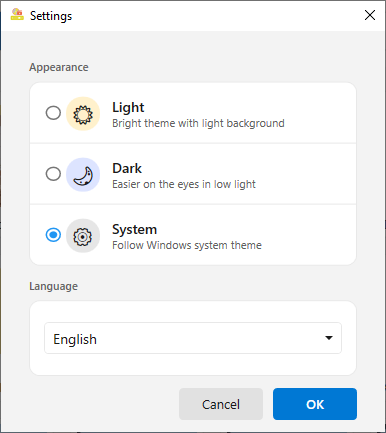
▲ 设置窗:三种主题 + 语言下拉框 + Cancel / OK▲ Settings: three themes, the language list, and Cancel / OK
2. 关于页:五个入口2. About: five links
点右上角问号图标 About。上面显示产品名和版本,下面一排是五个入口:
Click the question mark (About). The product name and version sit at the top, and five links follow:
- Online Tutorial:用浏览器打开你正在看的这份教程;
- Rate Us on Microsoft Store:去商店打分——这是对免费软件最直接的帮助;
- Send Feedback:直接在应用里写反馈提交,不需要开邮箱;
- Donate:自愿捐赠;
- Privacy Policy:隐私政策。
- Online Tutorial — opens this tutorial in your browser.
- Rate Us on Microsoft Store — leave a rating; it is the most direct way to help a free app.
- Send Feedback — write and submit feedback inside the app, no mail client needed.
- Donate — optional support.
- Privacy Policy — the privacy policy.
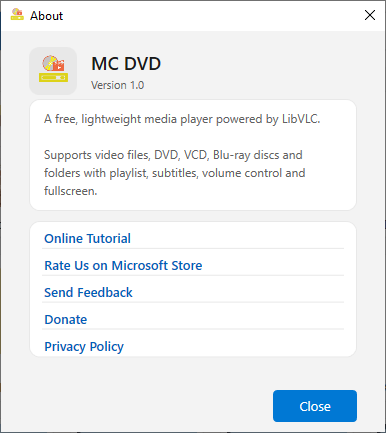
▲ 关于页:版本号与教程 / 评分 / 反馈 / 捐赠 / 隐私五个链接▲ About: version plus tutorial, rating, feedback, donate and privacy
3. 反馈怎么写才有用3. Writing feedback that gets fixed
- 描述操作路径:你点了哪个标签、哪个按钮,期望发生什么,实际发生了什么。
- 带上片子信息:格式(例如
mkv)、分辨率、是不是内嵌字幕。 - 留下邮箱(可选):要回复就填,不需要就留空。
- 保持「附带系统信息」勾选:会带上版本号、Windows 版本、界面语言,方便定位问题。
- Say what you did: which tab, which button, what you expected, what happened instead.
- Describe the file: container (e.g.
mkv), resolution, whether subtitles are embedded. - Leave an email (optional) if you want a reply; otherwise skip it.
- Keep "attach system information" ticked — it adds the app version, Windows version and UI language, which is usually what pinpoints the bug.