
1. 启动后你会看到什么1. What you see after launch
主窗口标题是 MC DVD,默认停在第二个标签 My Videos Folder。窗口分成三块:顶部一条功能栏、中间一排标签页、下方是标签页的内容区。
The window is titled MC DVD and opens on the second tab, My Videos Folder. It has three parts: a thin bar along the top, a row of tabs, and the content of whichever tab is selected.
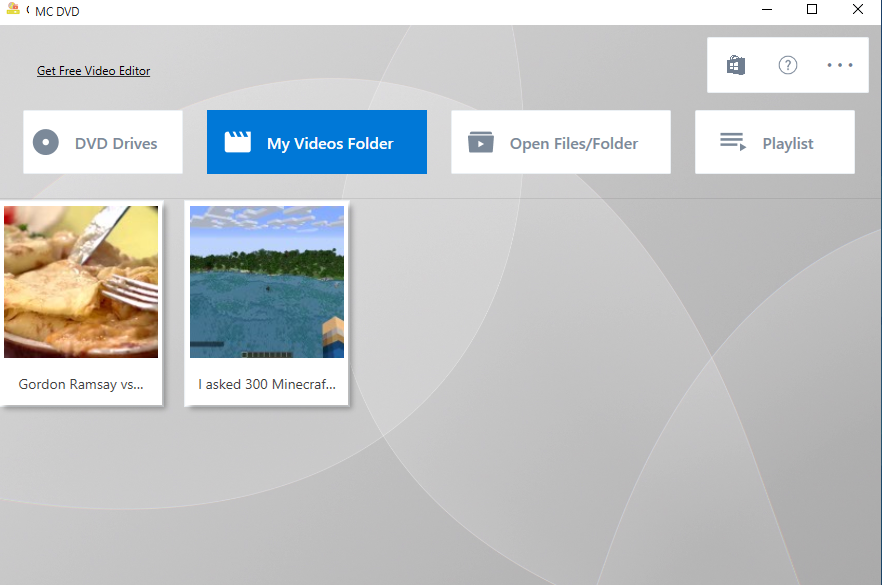
▲ 主界面:顶栏 + 四个标签页 + 媒体库内容区▲ The main window: top bar, four tabs, and the library area
2. 顶部功能栏2. The top bar
- Get Free Video Editor / Get Free Office Suite:左边两个链接,指向同厂商的其它免费产品,不需要可以一直忽略。
- Our Products(商店图标):打开应用商店里的产品列表。
- Settings(齿轮图标):主题与界面语言,见第 8 页。
- About(问号图标):版本信息,以及在线教程、评分、发送反馈、捐赠、隐私政策五个入口。
- Get Free Video Editor / Get Free Office Suite — two links on the left to other free products from the same publisher. Ignore them if you do not need them.
- Our Products (store icon) — opens the publisher's list in the Microsoft Store.
- Settings (gear icon) — theme and UI language, see page 8.
- About (question mark) — version, plus online tutorial, rate, send feedback, donate and privacy policy.
3. 四个标签页各管什么3. What each of the four tabs is for
| 标签Tab | 用来做什么What it does |
|---|---|
| DVD Drives | 列出这台机器上的光驱,点一下就能放盘里的 DVD / VCD / 蓝光。Lists the optical drives on this PC; one click plays the DVD / VCD / Blu-ray inside. |
| My Videos Folder | 把「视频」文件夹里的视频和子文件夹做成缩略图墙,双击就播。Shows the videos and subfolders in your Videos folder as a thumbnail wall; double-click to play. |
| Open Files/Folder | 手动打开:单个视频文件、VCD / DVD / 蓝光文件夹。Manual open: a single video file, or a VCD / DVD / Blu-ray folder. |
| Playlist | 播放队列,播过的文件会留在这里,可以右键移除。The play queue; everything you played stays here and can be removed with a right-click. |
4. 启动时的教程提示4. The tutorial prompt on startup
- 第一次启动:应用会直接用浏览器打开在线教程(也就是你正在看的这一份)。
- 之后的启动:3 秒后会弹一个小窗,标题 Online Tutorial for You,按钮 Yes / No。
- 不想要这个提示,勾上窗内的 Don't show tutorial popup again. 再关掉即可。
- First launch: the app opens this online tutorial in your browser.
- Later launches: three seconds after the window appears, a small dialog titled Online Tutorial for You shows up with Yes / No.
- To stop it, tick Don't show tutorial popup again. inside that dialog before closing it.
设置存在哪里:Where settings live:
主题、语言、上次播放的片段等信息保存在
%LOCALAPPDATA%\CoolleDVDFreePlayer\Settings.json,删除它相当于恢复默认设置。
Theme, language and the last-played position live in %LOCALAPPDATA%\CoolleDVDFreePlayer\Settings.json. Delete that file to go back to defaults.