
 Taskbar +Plus
A lightweight, open-source taskbar customiser for Windows 10 and 11. Transparency, blur and acrylic for every taskbar state.
Get it from Microsoft Store 中文教程Preset Taskbar Style is the fastest control in the app. Each scene can use a different one.
| Preset | What you see | Best for |
|---|---|---|
| Normal | The standard Windows taskbar, no transparency. | Maximum readability, screenshots, remote desktops. |
| Opaque | Solid colour, no wallpaper behind it. | Busy backgrounds, bright wallpapers, Start opened. |
| Clear | Fully transparent — only your wallpaper shows. | The Desktop scene, minimal setups. |
| Blur | A frosted strip: blurred wallpaper, no tint. | Dark wallpapers, keeping icons legible. |
| Acrylic | Blur plus a translucent tint and a light noise texture. | Maximized windows, a modern Windows 11 look. |
Switching presets is instant. Move the mouse between Clear and Blur and you will see the taskbar change as you click.
Accent Color opens the colour picker for that scene. Tint the taskbar to match your wallpaper, or pick the Windows accent colour so the taskbar, Start and title bars share the same hue. Clear and Blur ignore the tint more than Opaque and Acrylic do, so the effect is strongest on the heavier presets.
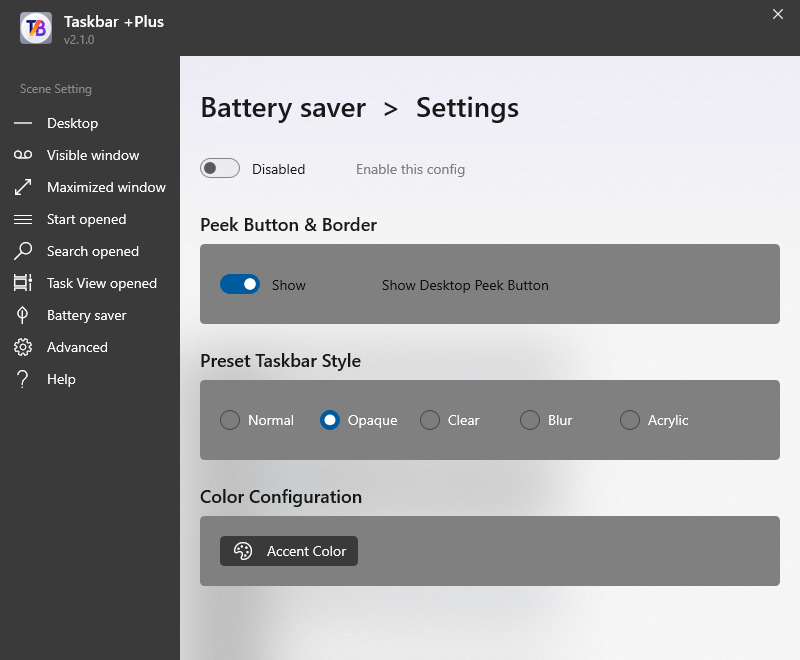
The Battery saver scene, set to Opaque — no blur work while the machine is trying to save power.
Blur and acrylic are GPU effects. On a laptop running low, Windows switches to battery saver and the cleanest response is to drop the effects entirely: