
 Taskbar +Plus
A lightweight, open-source taskbar customiser for Windows 10 and 11. Transparency, blur and acrylic for every taskbar state.
Get it from Microsoft Store 中文教程Taskbar +Plus is a lightweight, open-source utility that turns your Windows taskbar into part of your desktop. Instead of a solid grey strip, the taskbar can become transparent, blurred or acrylic, so your wallpaper shows through and the desktop looks like one surface instead of two.
It runs quietly in the tray, keeps memory use low, and applies every change instantly — there is no restart and no reboot.
The app is distributed through the Microsoft Store, so updates are handled for you:
Get Taskbar +Plus from Microsoft Store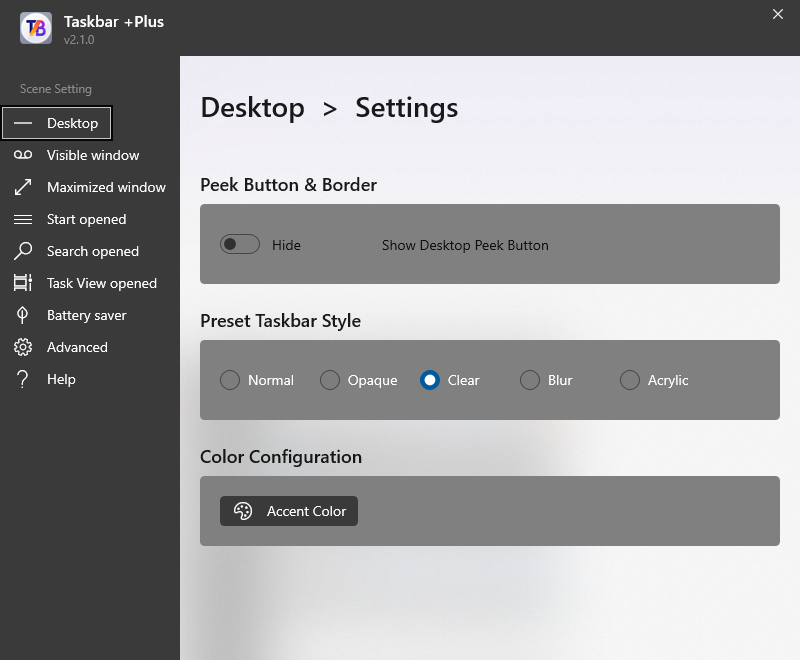
The Desktop scene with its three setting groups: Peek Button & Border, Preset Taskbar Style and Color Configuration.
The left sidebar is split into two parts:
Continue with page 2 to set up the three everyday scenes, or jump straight to page 4 if you only want to change the taskbar style and colour.