
How to Convert PDF to Text
如何将 PDF 转文本
Extract text content from PDF into TXT, XML, HTML or RTF. OCR turns scanned PDFs into editable and searchable text.
从 PDF 提取文本内容为 TXT、XML、HTML 或 RTF。OCR 可将扫描 PDF 转为可编辑、可搜索的文本。
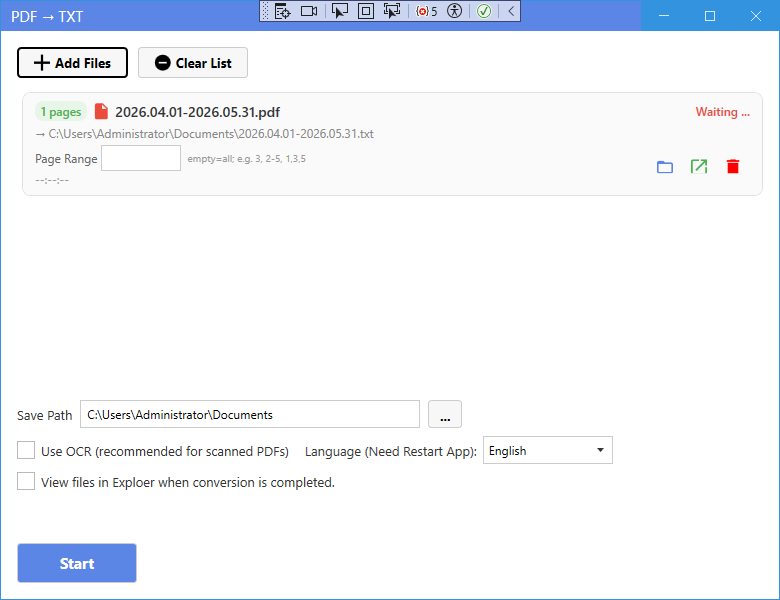
New UI
新版界面
- On the home page, click PDF to Text (or the XML / HTML / RTF entry).
- Click Add Files and select the PDF files.
- Choose the target format in the window (TXT, XML, HTML or RTF).
- For scanned PDFs, tick Use OCR and choose the language.
- Click Start to extract the text.
- 在主页点击 PDF 转文本(或 XML/HTML/RTF 入口)。
- 点击添加文件选择 PDF 文件。
- 在窗口中选择目标格式(TXT、XML、HTML 或 RTF)。
- 扫描件勾选使用 OCR 并选择语言。
- 点击开始提取文本。
Classic Mode
经典模式
- In Classic Mode, click the corresponding card on the home page, add your files, set options if needed, and press Start.
- 在经典模式中,点击主页对应卡片,添加文件,按需设置选项后点击开始。
Tip: For scanned PDFs, always enable OCR to get searchable text.
提示:扫描件请务必开启 OCR,才能得到可搜索的文本。