
How to Convert PDF to Images
如何将 PDF 转图片
Export PDF pages as JPG, PNG or TIFF images. Supports single pages, page ranges and non-continuous pages.
将 PDF 页面导出为 JPG、PNG 或 TIFF 图片。支持单页、页范围与不连续页。
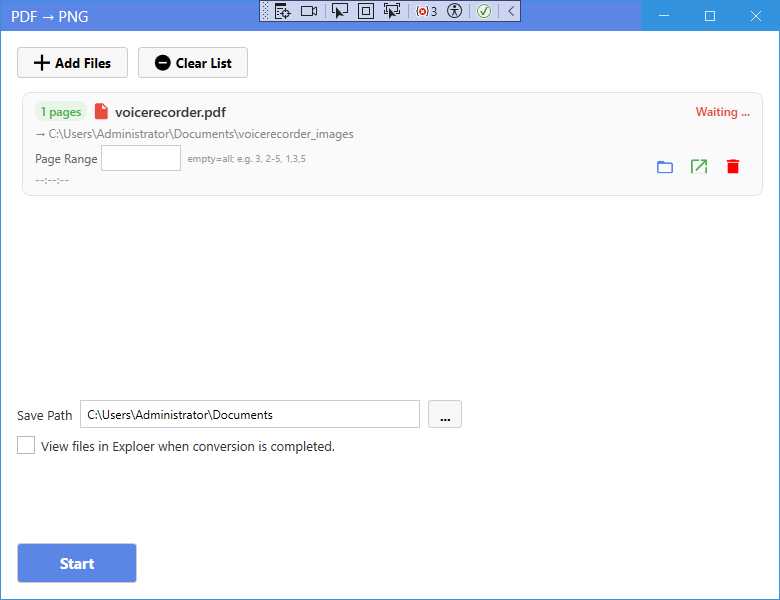
New UI
新版界面
- On the home page, click PDF to PNG, PDF to JPG or PDF to TIFF depending on the format you want.
- Click Add Files and select the PDF files.
- Set the page range if needed — e.g. 3 for a single page, 2-5 for a range, 1,3,5 for non-continuous pages.
- Click Start to export.
- Images are saved into a folder named after the PDF (e.g. document_images), one file per page.
- 在主页根据需要的格式点击 PDF 转 PNG、PDF 转 JPG 或 PDF 转 TIFF。
- 点击添加文件选择 PDF 文件。
- 如需可设置页范围——如 3 单页、2-5 范围、1,3,5 不连续页。
- 点击开始导出。
- 图片保存到以 PDF 命名的文件夹中(如 document_images),每页一个文件。
Classic Mode
经典模式
- In Classic Mode, click the corresponding card on the home page, add your files, set options if needed, and press Start.
- 在经典模式中,点击主页对应卡片,添加文件,按需设置选项后点击开始。
Tip: PDF to image does not need OCR — it directly renders the pages.
提示:PDF 转图片不需要 OCR——直接渲染页面。