Rearrange columns by dragging the header
In the Details view the column order is no longer fixed. Press a column header and drag it left or right: the header follows your pointer, the surrounding columns slide aside to show where it will land, and the new order is applied when you release the mouse button. Nothing moves until you let go, so you can always change your mind.

Before: Name, Tag, Date modified, Type, Size.

After dragging Type onto Tag. The files follow the new order.
New column: Date taken
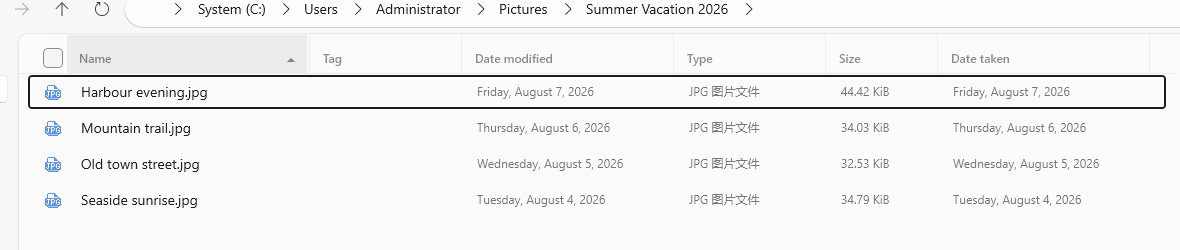
The Details view has a new Date taken column for photos and videos. It reads the capture date stored inside the file (EXIF DateTaken for photos, the encoded date for videos), which is often different from the date the file was copied or modified.
Thumbnails and previews for legacy image formats
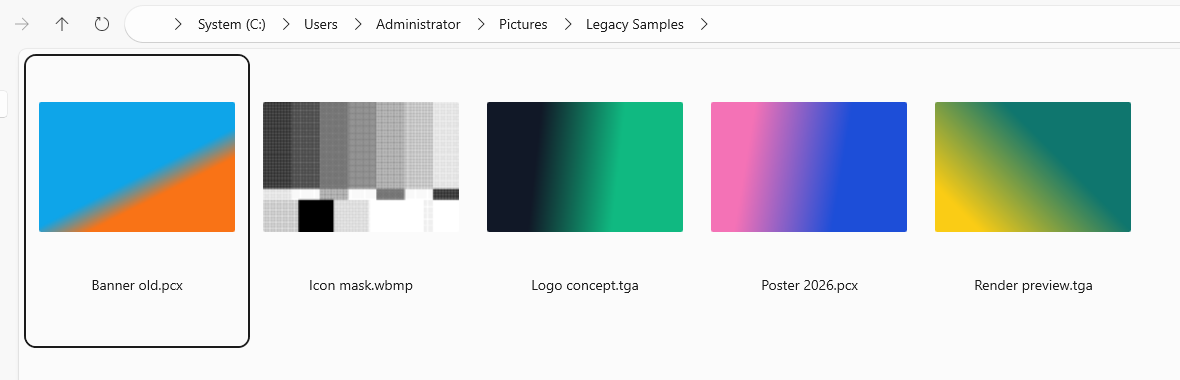
Older image formats no longer show up as anonymous file icons. Files Manager can now decode them itself, so PCX, EPS, PSD, TGA and WBMP files get thumbnails in Grid and List views and open in the preview pane, just like JPG or PNG.
Smaller install, less noise
- Nothing extra to install. The Store package ships with its own runtime, so the app starts without downloading a separate framework first — and updates are less likely to fail half way.
- No telemetry. Third-party crash reporting has been removed. The app no longer sends error reports to an external service.
Fixed in this release
- Typing a keyword in the address bar no longer jumps back to the current folder — the text stays and the search runs.
- The file name can now be copied while you are renaming it, so you can paste it somewhere else without cancelling the rename.
Update & learn more
Version 4.2.9 is available from the Microsoft Store. Your settings, tags and favourites are kept when you update.