Paste
Inserts the contents of the clipboard at the location of the cursor, and replaces any selected text or objects.

In a spreadsheet, when you paste a range of cells from the clipboard, the result depends on the current selection: If only one cell is selected, the cell range will be pasted started from that cell. If you mark a cell range wider than the cell range in the clipboard, the cell range will be pasted repeatedly to fill the selected cell range.
Pasting contents in MC Office Suite Calc
When copying a cell or a range in MC Office Suite Calc the selection is marked with blinking dashes around the range (the "marching ants") to indicate what was being selected during the clipboard operation.
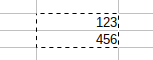
There are two ways to paste the clipboard contents in a spreadsheet document:
-
Using Command
Using Enter key: the clipboard contents is pasted once and cleared. No further paste is possible with the clipboard contents. The copied selection mark is disabled.

To deactivate the copied selection mark press the Esc key. The clipboard contents is not cleared.